All features

Cloudesk Helpdesk

Every customer question, answered on time.

Emails to your support address become numbered tickets, and calls get logged in a few seconds. Each one gets response targets by priority, counted in your working hours and paused while you wait on the customer. Replies go out by email with a link where the customer can read the whole conversation, add to it and rate how you did.

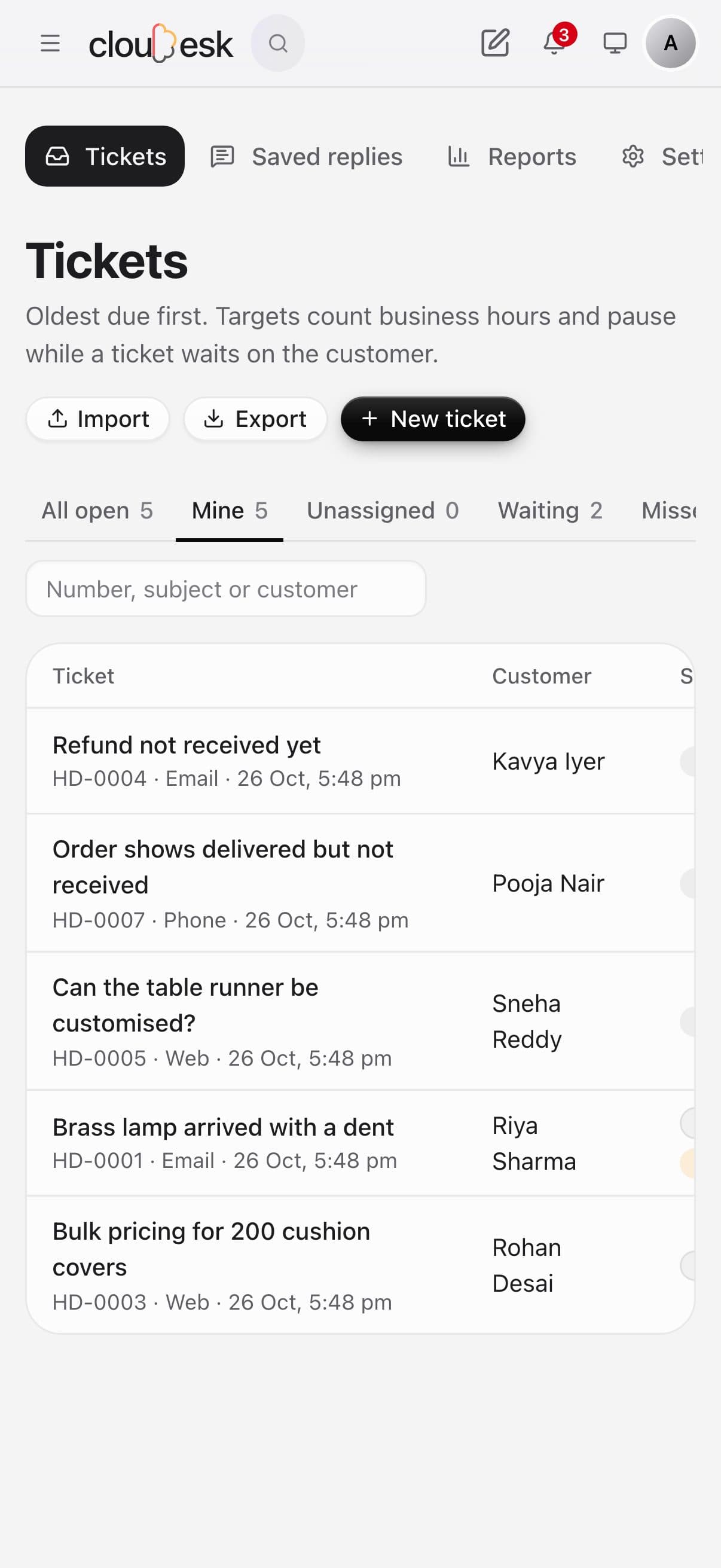
The helpdesk on a phone

Real screenshots from the app, using a demo workspace.

How it works

Three steps, no surprises

  1. 1

    Set your hours and targets

    Working days and hours in India time, holidays, and how fast to reply and resolve for low, normal, high and urgent tickets.

  2. 2

    Connect your support email

    Point your email provider's inbound forwarding at your Helpdesk address. Replies with the ticket number thread onto the ticket.

  3. 3

    Work the inbox

    Mine, unassigned, waiting and missed-target views, oldest due first. Reply, add an internal note, or use a saved reply.

The tour

Every tool, up close.

  1. 01One inbox

    Phone, email and web — one list.

    Tickets arrive by email, from the support form on your website, or logged by the team after a call. The oldest due comes first, and response targets count business hours only.

    • Mine, unassigned, waiting and missed-target views
    • Assign in turn across the team
    • Targets pause while you wait on the customer
    • Import from another helpdesk
    The ticket list: open tickets with priority, assignee and when the next reply is due
  2. 02Replying

    Answer fast, keep notes private.

    Reply to the customer by email or leave an internal note for the team — notes never reach the customer. Saved replies fill in the name and ticket number for you.

    • Internal notes stay inside
    • Saved replies with placeholders
    • Every status change on the timeline
    • Customer details and a link to the CRM
    A ticket with the customer's message, an internal note and the reply
  3. 03Reports

    Know you're keeping your promises.

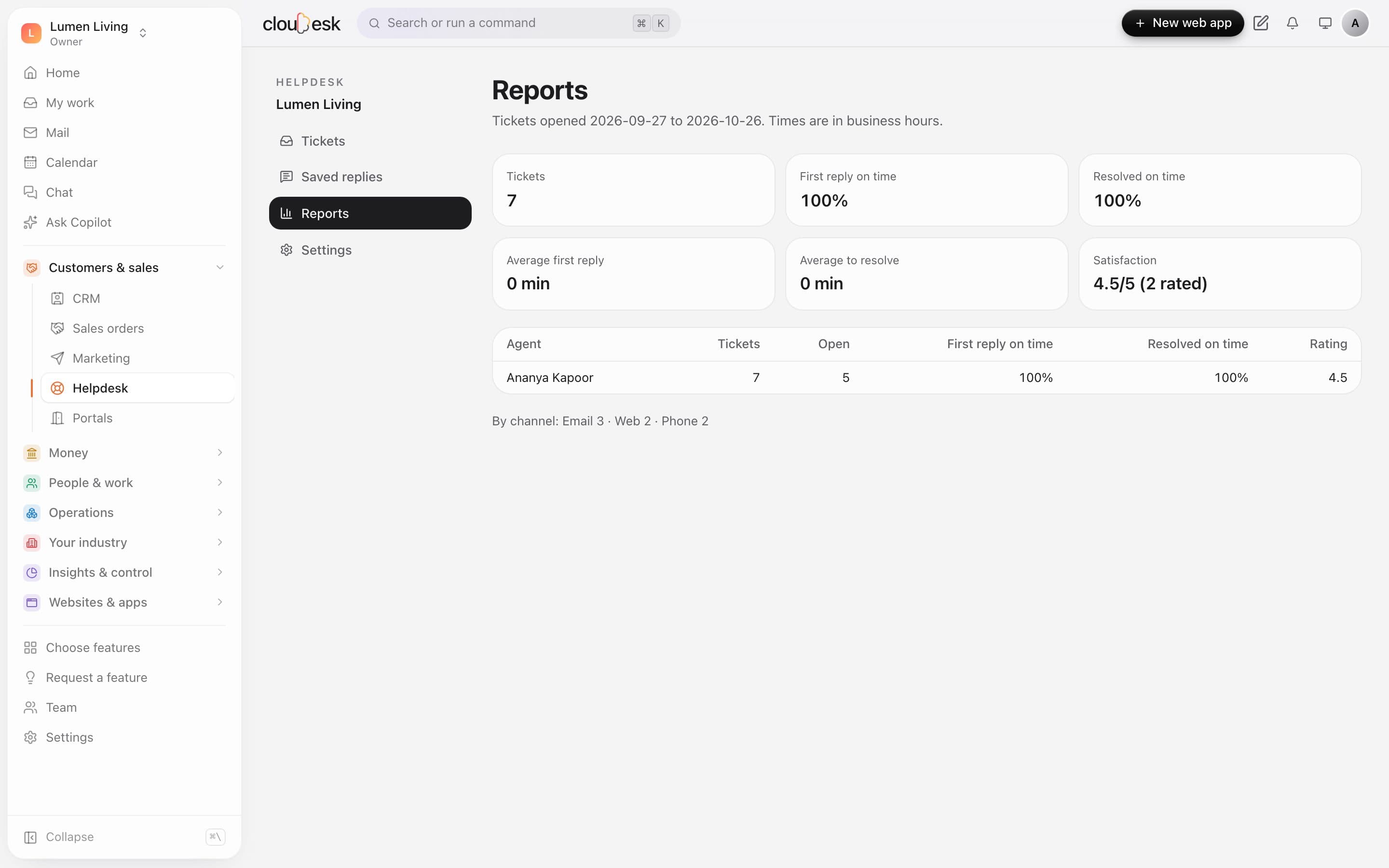
    See how many replies and resolutions met their targets, by agent and by channel. Customers rate resolved tickets on their own link, and the score shows here.

    • First reply and resolution on time
    • Per agent
    • By channel
    • Satisfaction from customer ratings
    Helpdesk reports: replies and resolutions on time, and satisfaction

In detail

What you get with Cloudesk Helpdesk

Targets in business hours

Missed targets are flagged and the agent (or an admin, if nobody has it) is told. The clock pauses while a ticket waits on the customer.

Good to know

We'd rather be upfront than surprise you later:

  • Receiving email needs an inbound email service (for example Postmark inbound) that posts to your Helpdesk address; sending uses your workspace's email setup.
  • Attachments in emails aren't stored yet; the text of the message is.
  • Resolved tickets close by themselves after 7 days with no reply (you can change this).

Questions people ask

What happens if a customer replies to a resolved ticket?+

It reopens and the agent is told. Replies to a closed ticket start a new one.

Can someone else reply on a ticket by using its number?+

No. Email replies are only added when they come from the ticket's customer; anyone else starts their own ticket.

Works beautifully with

Give it a spin — it's free to start.

Next up: Cloudesk Mail →

Start free