All features

Cloudesk Sales orders

From the order to the invoice, without retyping it.

For distributors, wholesalers, manufacturers and anyone who sells on credit. Take an order and the customer's price list fills in the rates; confirming it checks their credit limit and any big discount; deliver on challans straight from stock; invoice what went out; take returns back with a credit note — and see what each salesperson sold against their target.

Sales orders on a phone

Real screenshots from the app, using a demo workspace.

How it works

Three steps, no surprises

  1. 1

    Set prices and terms

    A standard price list, and lists for dealers or seasons with quantity breaks or a discount off standard. Give each customer a price list, a credit limit, payment terms and a salesperson.

  2. 2

    Take and confirm orders

    Rates come from the customer's list. Confirming checks their hold, what they owe plus other open orders against their limit, and discounts above your limit — those go for approval.

  3. 3

    Deliver, invoice, collect

    Make delivery challans from any location; stock goes out as they're made. Invoice what's delivered as a draft GST invoice in your books, and take returns back with a credit note.

The tour

Every tool, up close.

  1. 01At a glance

    What to deliver, what to invoice, who's buying.

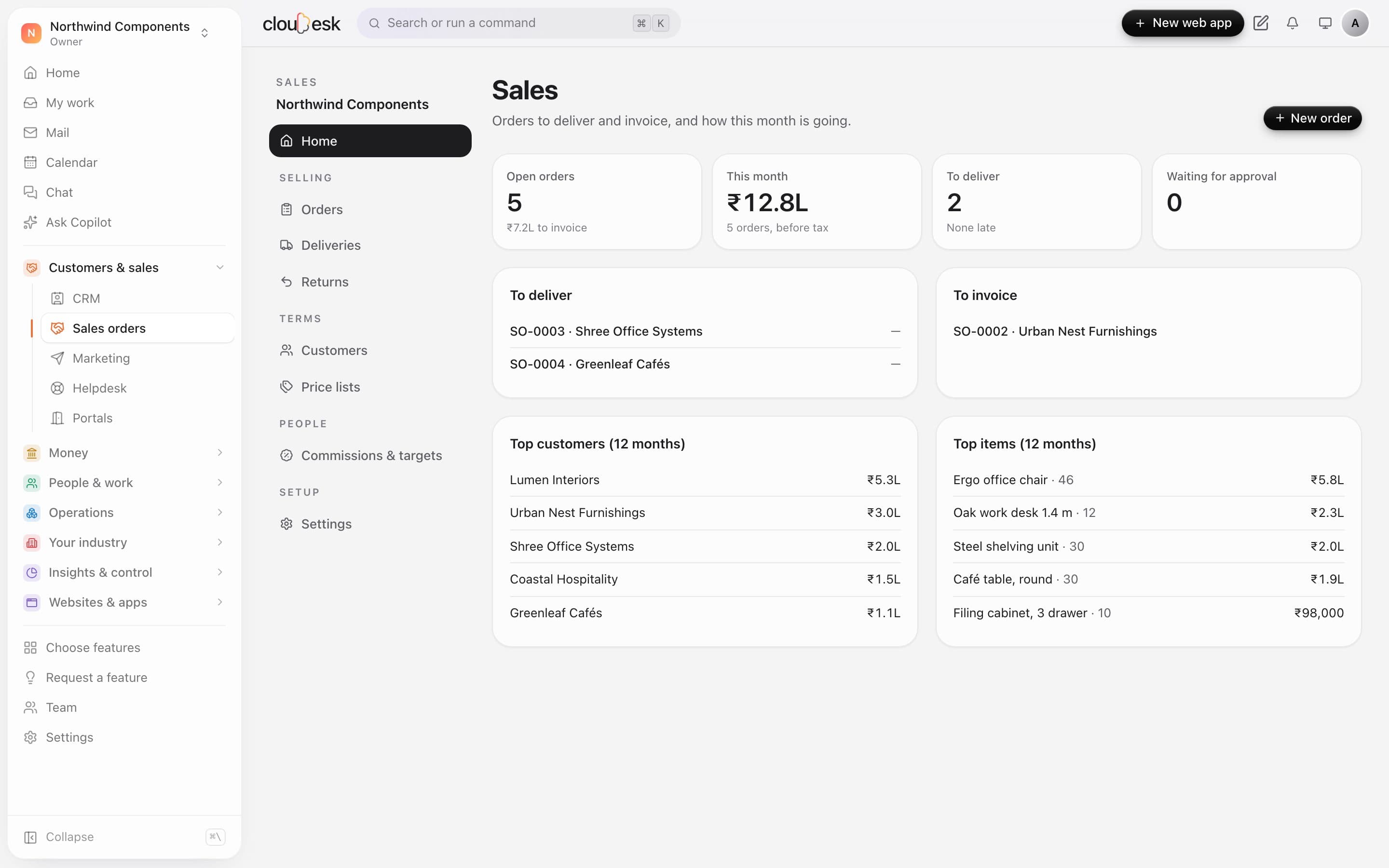
    The sales home shows this month's orders, the ones still to deliver and to invoice, and your best customers and items over the last year. Open any order straight from the lists.

    • Open orders and the value still to invoice
    • Orders to deliver, with late ones flagged
    • Top customers and items for 12 months
    The sales home with this month's figures and the to-deliver and to-invoice lists
  2. 02Orders

    Every order, from confirmed to invoiced.

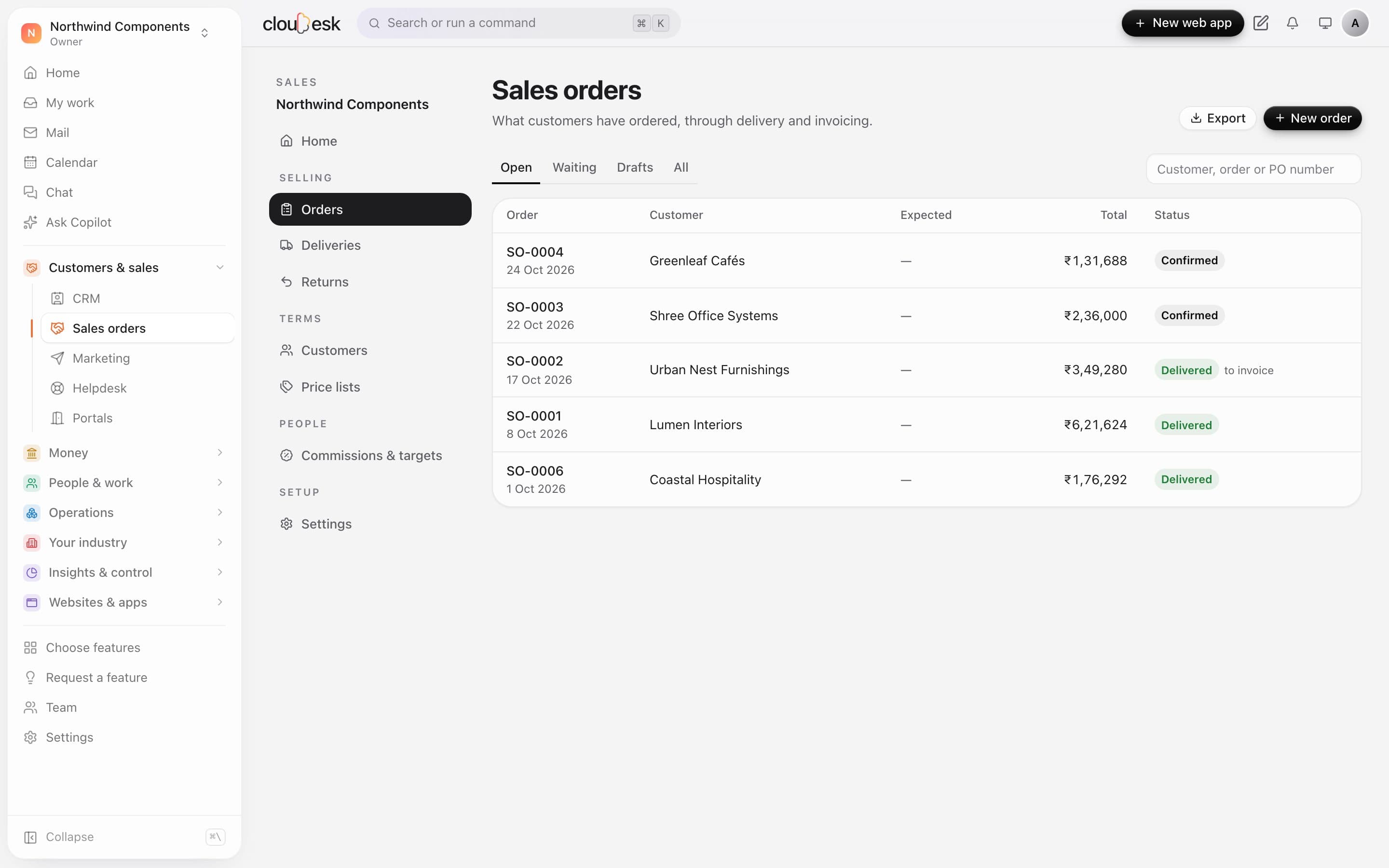
    Orders move from draft to confirmed, delivered and invoiced, and the list says where each one stands. Orders that need approval wait in their own tab.

    • Open, waiting, draft and all orders
    • Search by customer, order or PO number
    • Export the list to a spreadsheet
    Sales orders with their customers, totals and status
  3. 03One order

    Deliver on a challan. Invoice in one click.

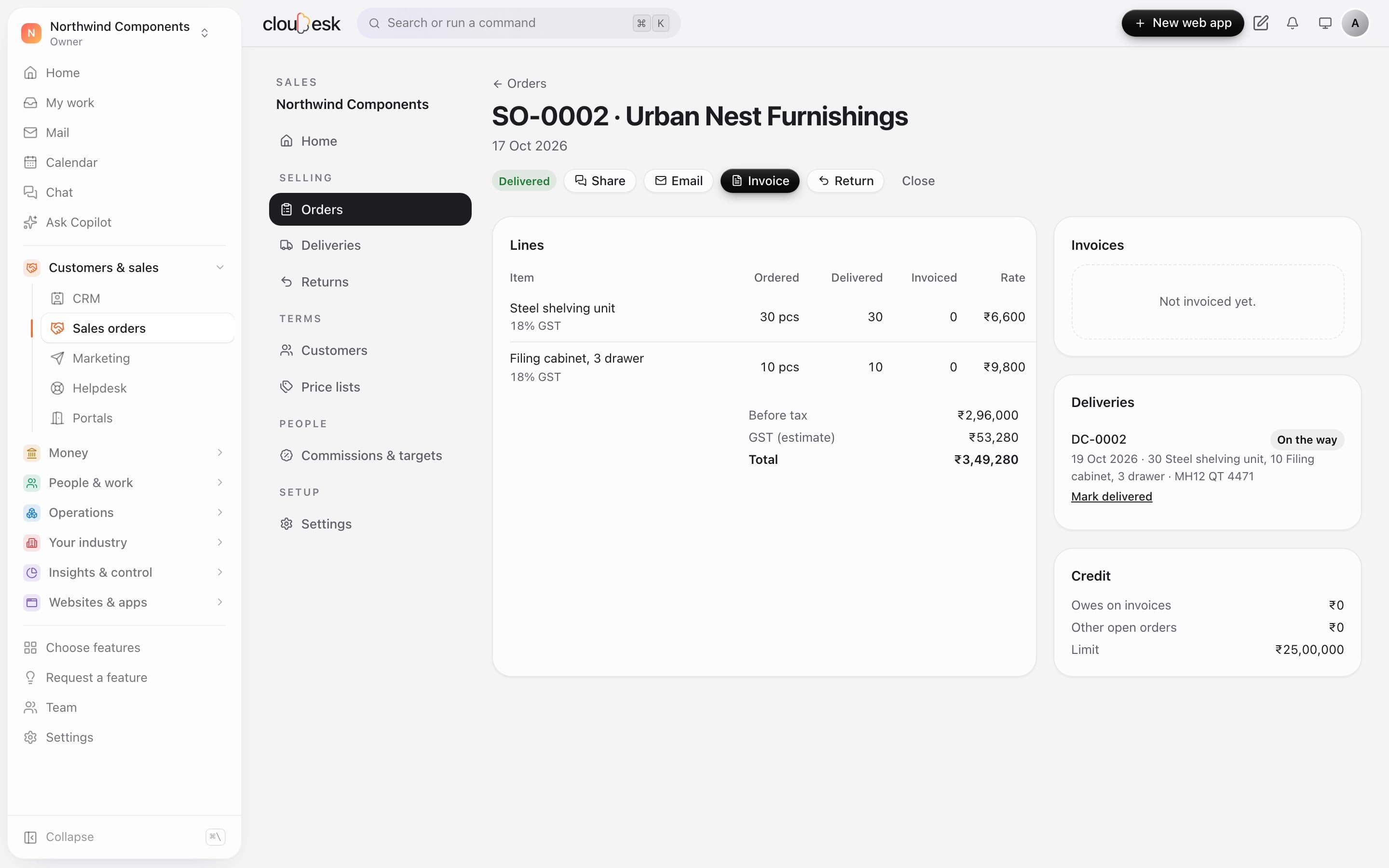
    Each order tracks what was ordered, delivered and invoiced, line by line. Delivery challans take stock out, and the invoice is made from what was delivered.

    • Ordered, delivered and invoiced per line
    • Delivery challans with the vehicle number
    • The customer's credit used and their limit
    A delivered sales order with its delivery challan and the customer's credit
  4. 04Price lists

    The right price fills in by itself.

    Keep standard prices, dealer prices that start from a quantity, and dated discounts. Give a customer their price list and every order uses it.

    • Fixed prices or a discount on the standard
    • Lower prices from a minimum quantity
    • Import and export prices as a spreadsheet
    A dealer price list with prices that start from 10 pieces

In detail

What you get with Cloudesk Sales orders

Price lists that think

Fixed prices with quantity breaks (a lower price from 10 pieces), or a percentage off standard, valid between dates. Margins against average cost are shown on each price.

Good to know

We'd rather be upfront than surprise you later:

  • Customers are the clients in your invoicing books, so Invoices & finance is needed. Delivering from stock needs Inventory.
  • Invoices made from orders are drafts — you check, issue and send them from your books.
  • Tax on an order is an estimate per line; the invoice works out GST exactly (CGST and SGST, or IGST).
  • An order that's partly delivered or invoiced can't be edited; close it and take a new one for the rest.
  • Orders are in rupees. There are no blanket orders, schemes (buy 10 get 1) or route-based beat planning yet.

Questions people ask

What counts towards a credit limit?+

What the customer owes on issued invoices (less credit notes), plus what's still to invoice on their other confirmed orders, plus the new order.

Will invoicing an order take stock out again?+

No. Stock goes out on the delivery challan; the invoice made from the order isn't linked to stock items.

Who can approve a held order?+

If you've set an approval rule for sales orders in Settings → Approvals, its approvers do, from My work. Otherwise an owner or admin approves it on the order. An owner's or admin's own order isn't held.

How is commission worked out?+

On sales before tax from each salesperson's orders in the period — invoiced less credit notes, or collected — at the rate of their own plan, or the plan for everyone.

Works beautifully with

Give it a spin — it's free to start.

Next up: Cloudesk Manufacturing →

Start free