All features

Promotions & recovery

Promotions that bring shoppers back — honestly.

Pop-ups, announcement bars, floating buttons and cart upsells, plus abandoned-cart reminders that send themselves and product listings written from a photo. Every offer works at checkout — no fake timers, no fake codes.

A pop-up offer on a phone

Real screenshots of promotions on a demo bakery. The views and sign-ups come from test visits to its live site.

How it works

Three steps, no surprises

  1. 1

    Pick a promotion

    Start from a ready-made welcome offer, exit-intent discount, flash-sale bar or free-delivery nudge.

  2. 2

    Make it yours

    Change every word, choose when it opens and where it shows, and preview it on your own home page.

  3. 3

    Switch it on

    It goes live instantly — no republishing — and you see views, clicks and sign-ups.

The tour

Every tool, up close.

  1. 01Everything in one place

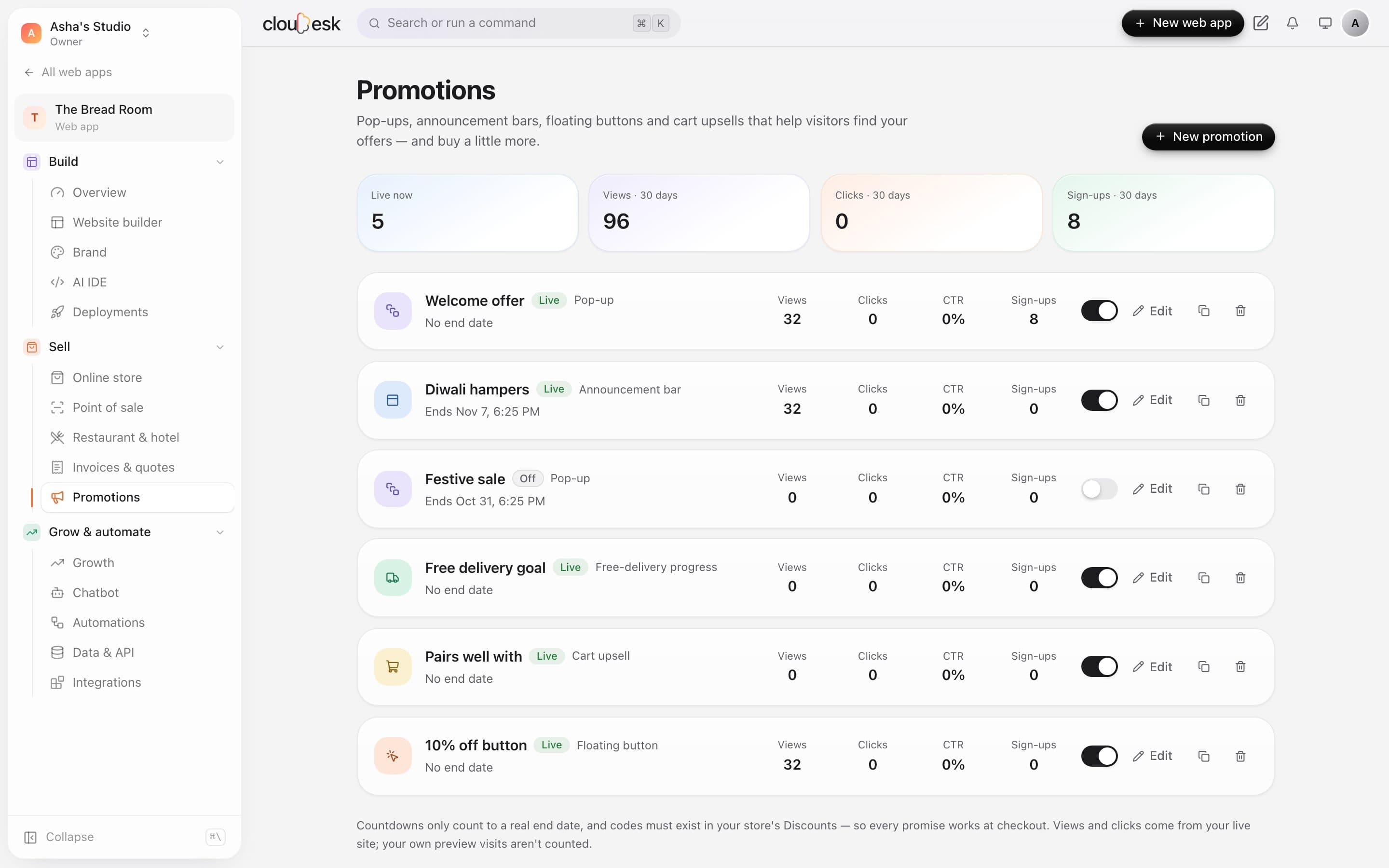
    Pop-ups, bars, buttons and cart offers — switch them on and off.

    See what's live, what's scheduled and how each promotion is doing over the last 30 days. Every count comes from real visitors to your site.

    • Views, clicks, click rate and sign-ups
    • Schedule a start and an end
    • Duplicate a promotion that worked
    Promotions with their stats and on/off switches
  2. 02Pop-ups

    Grow your list with an offer that actually works at checkout.

    A pop-up can collect emails, show a code or link to a sale. Codes must exist in your discounts before a pop-up can go live — so every promise is kept.

    • After a delay, on scroll or on exit
    • Show once a day, a week or once ever
    • Desktop, phone or both
    A 10% off pop-up on The Bread Room's home page
  3. 03Edit with a preview

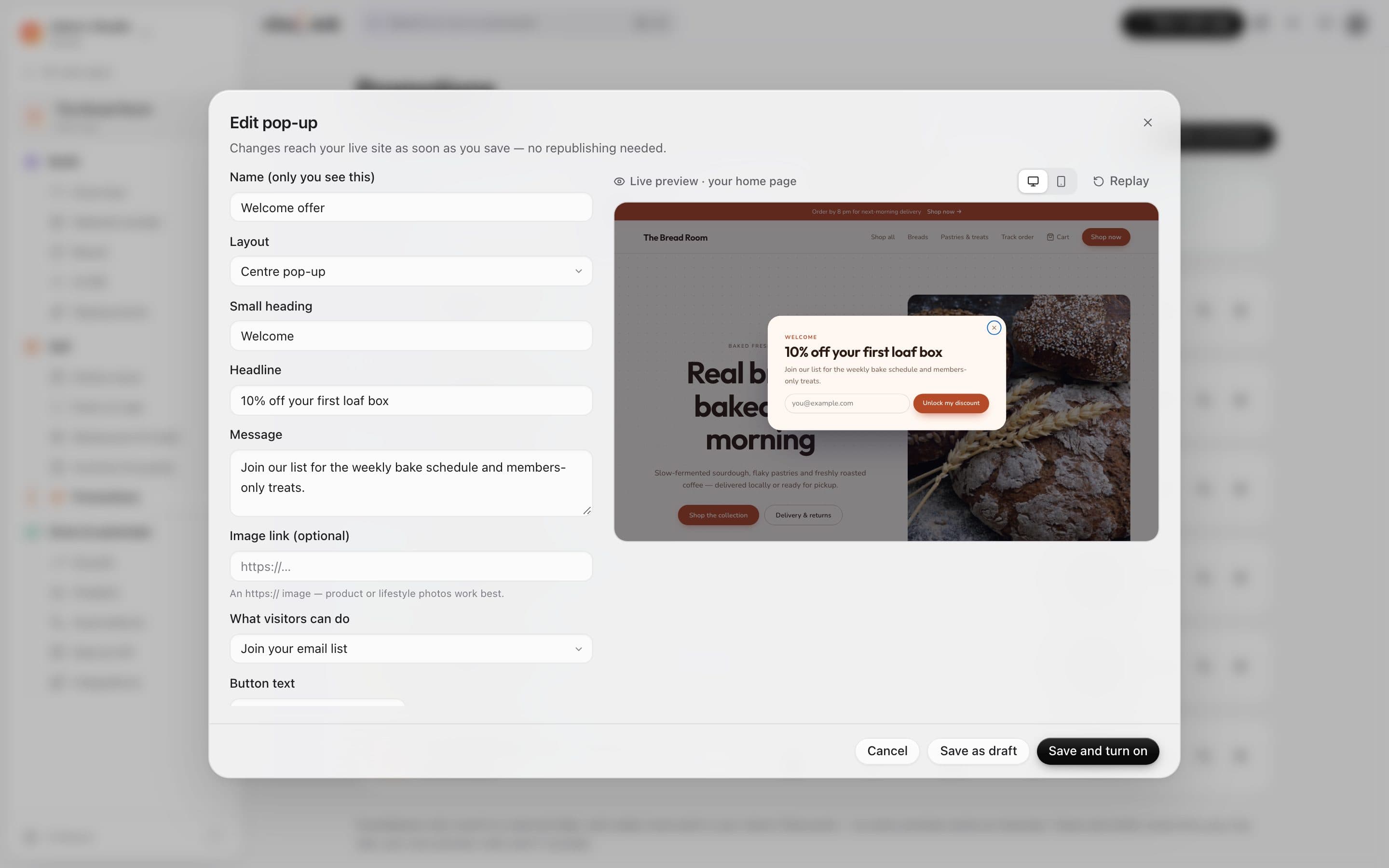
    See it on your real page while you write it.

    Change the words, layout and timing, and the preview updates on your own storefront — on desktop or phone.

    • Centre, corner or bottom-sheet layouts
    • Countdowns need a real end date
    • Pick the pages it shows on
    Editing the welcome pop-up with a live preview
  4. 04In the cart

    Bigger baskets, without a hard sell.

    A progress bar shows how close a shopper is to free delivery, using your real delivery rate. Below it, products that go with what's in the cart.

    • Uses your actual free-delivery amount
    • Suggestions from the same collections
    • Add to cart in one tap
    A cart with a free-delivery progress bar and Pairs well with your bake
  5. 05Listings from a photo

    Snap a product. Get a listing to review.

    Upload one photo and the AI drafts a title, description, tags and — for Indian stores — a suggested HSN code and GST rate. It never sets your price or stock.

    • Describes only what it can see
    • Tells you what to check before publishing
    • Needs an AI provider connected
    Add a product from a photo: choose a photo, then Write my listing

In detail

What you get with Promotions & recovery

Pop-ups that behave

Centre, corner or bottom banner; open after a delay, on scroll, on exit intent or from a button — with once-a-day or once-a-week caps.

Good to know

We'd rather be upfront than surprise you later:

  • Discount codes in promotions must exist in your store's Discounts, and countdowns need a real end date.
  • Reminders only go to shoppers who agreed to hear from you, once per cart. Listings from photos need an AI provider key.

Questions people ask

Will pop-ups annoy my visitors?+

You choose how often they show — once a visit, a day or a week — and visitors can always close them with one tap or Escape.

Do I need to republish after changes?+

No. Promotions are added as pages are served, so saving, pausing or ending one takes effect immediately.

Does the AI set my prices?+

Never. It drafts words and tax suggestions only; you set price and stock and review everything before saving.

Works beautifully with

Give it a spin — it's free to start.

Next up: Growth & analytics →

Start free